RANGER SERIES
AI-POWERED
DupeRangerAi
AI-Powered Duplicate Detection & File Organization
Combines intelligent duplicate file detection with AI-powered categorization using local language models. Efficiently manage disk space while automatically organizing your files with machine learning.
What is DupeRangerAi?
DupeRangerAi is a Windows-based utility that revolutionizes file management by combining fast duplicate file detection with AI-powered categorization. Using local language models from Hugging Face, it analyzes and organizes files within your file system, enabling efficient disk space management with intelligent automation.
Application Interface
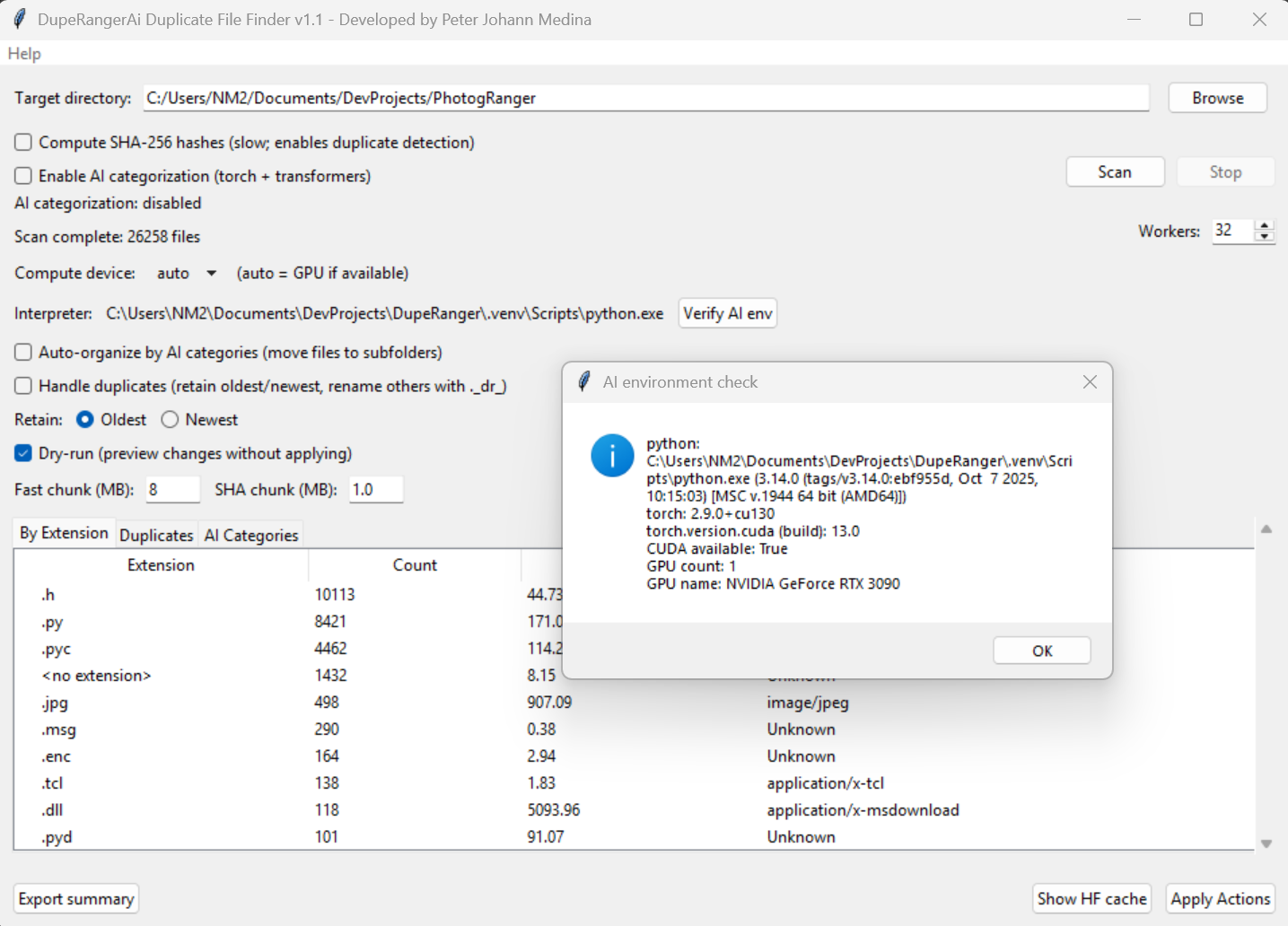
DupeRangerAi GUI showing AI categorization and duplicate detection results
AI-Powered Intelligence
Built on transformer models from Hugging Face, DupeRangerAi classifies files into intelligent categories including Photos, Videos, Audio, Documents, Archives, Code, Spreadsheets, Presentations, Backups, and Miscellaneous. GPU acceleration with CUDA is supported, with automatic CPU fallback for universal compatibility.
Core Features
Smart Duplicate Detection
- Two-phase: xxHash + SHA-256 verification
- Fast fingerprinting for quick scans
- Configurable retention (oldest/newest)
- Automatic ._dr_ prefix marking
AI Categorization
- Transformer models from Hugging Face
- 10+ intelligent file categories
- GPU acceleration (CUDA)
- Automatic CPU fallback
File Organization
- Category-based folder creation
- Subfolder or custom directory options
- Intelligent filename collision handling
- Preview before execution
Safety Mechanisms
- Complete transaction logging
- Dry-run mode for testing
- Mid-execution cancellation
- Graceful error handling
- Rollback capability
System Requirements
- ✓ Python 3.8 or later
- ✓ Windows 10/11 (64-bit recommended)
- ✓ Optional: NVIDIA CUDA for GPU acceleration
- ✓ Hugging Face transformers library
- ✓ tkinter for GUI (included with Python)
Installation
# Clone the repository

git clone https://github.com/peterjohannmedina/duperangerai.git

cd duperangerai


# Install with CPU support

python install.py --cpu


# Or install with GPU support (NVIDIA CUDA)

python install.py --gpu
Usage Workflow
- Launch: Run
python DupeRangerAi.py or use standalone executable
- Select Directory: Choose your target folder for scanning
- Configure: Set SHA-256 hashing, AI categorization, worker threads, chunk sizes
- Scan: Execute the scan and let AI analyze your files
- Review: Browse results across three tabs:
- File Extensions
- Duplicates
- AI Categories
- Organize: Preview and apply organizational actions
Performance Optimization
DupeRangerAi adapts to different storage types for optimal performance:
| Storage Type |
Fast Chunk Size |
SHA Chunk Size |
| NVMe SSD |
8-16 MB |
1-2 MB |
| SATA SSD/HDD |
4-8 MB |
0.5-1 MB |
| Network/SMB |
1-4 MB |
0.25-0.5 MB |
| USB/External |
0.5-2 MB |
0.125-0.25 MB |
AI File Categories
Media Files
- Photos (.jpg, .png, .raw)
- Videos (.mp4, .avi, .mkv)
- Audio (.mp3, .flac, .wav)
Documents
- Documents (.docx, .pdf, .txt)
- Spreadsheets (.xlsx, .csv)
- Presentations (.pptx, .key)
Development
- Code files (.py, .js, .cpp)
- Archives (.zip, .tar, .rar)
- Backups & misc files
Architecture Highlights
- FileScanner: Multi-threaded scanning engine with queue-based processing
- FileClassifier: AI categorization using Hugging Face transformers
- FileOrganizerApp: Tkinter GUI with real-time updates
- GPU/CPU Detection: Automatic device selection for optimal performance
- Transaction Logging: Complete audit trail for all operations
Safety First
Built-in Protection
- ✓ Preview Dialogs - See all planned operations before execution
- ✓ Transaction Logs - Complete rollback capability for all changes
- ✓ Dry-Run Mode - Test operations without making actual changes
- ✓ Error Handling - Graceful handling of locked files and permissions
- ✓ Cancel Anytime - Stop operations mid-execution safely
Why DupeRangerAi?
- AI-Powered Intelligence - Local machine learning models for smart categorization
- Lightning Fast - Two-phase hashing with optimized chunk sizes
- Modern Interface - Clean Tkinter GUI with real-time progress
- Enterprise Safety - Transaction logging and rollback capability
- GPU Accelerated - CUDA support with automatic CPU fallback
- Highly Configurable - Adapt to any storage type for optimal performance
- Comprehensive Reporting - Three-tab interface for detailed analysis
What's Included
- DupeRangerAi.py - Main application with Tkinter GUI
- install.py - Automated dependency installation (CPU/GPU)
- FileScanner - Multi-threaded scanning engine
- FileClassifier - AI categorization module
- PyInstaller Support - Build standalone executables
Version History
Version 1.1 (November 2025)
- ✓ Fixed missing Hugging Face cache helper functions
- ✓ Improved error handling for locked files
- ✓ Enhanced GPU/CPU device detection
- ✓ Updated transformer models support